In my last post I was exercising my search engine choice for kicks. Choosing a search engine is easy, you type in the URL and get directed to the home page of your favourite search engine's site. If you prefer one and want it to be your default search engine, Firefox has a handy pull down menu where you can manage your search engines and set your engine of choice.
This is just one of the many ways that Firefox, and Mozilla, promote choice. Another way we do it is by providing the world's best browser in over 70 languages, and on multiple platforms. We give users the choice of a browser that is built with them in mind. For security, accessibility, and extensibility users can count on Mozilla's Firefox to be doing its best to improve the areas that make the open web work.
The Microsoft Browser Ballot screen has started to roll out this week and there are people who are most likely not expecting, nor informed about what it means to make a choice as it relates to the web browser. It's important that we not forget that many people don't know what a web browser is.
I recently posted about how I suspect the design of the ballot screen will scare away people before they even get a chance to make a choice. For those that make it to the second screen (where you are presented with the 5 top browsers by market share) there is another obstacle: lack of information. The screen doesn't tell you why choosing your browser is important. It doesn't tell you which browsers are more secure, which ones work with screen readers, which ones can be extended to add custom functionality. These are important factors in making a choice. Otherwise "choice" is really "pick the pretty logo and see what happens". Or perhaps "choice" is "stay with what you know, cause change is scary".
Which web browser you use may seem trivial thing at first but when you look under the hood - it matters that your know the browser you choose will work with your assistive technology. It matters that your identity is safe, that a site's legitimacy is explorable before you make an online purchase, and that you can customize your web browser to maximize your efficiency. I've had several academics tell me they rely on Firefox add-ons to help them cite, bookmark, and make notes in the browser as they prepare class materials. Your browser can make viewing the web a comfortable, seamless, and efficient experience. Don't you want to have the information to help you make the choice that's best for you?
I hope that John Lily's letter, and other blog posts in the coming weeks will reach a wide audience and help supplement the lack of information that the ballot screen contains. Just as it would be odd to let a stranger pick your car out for you - with no information about your driving habits, family size, gas budget, style preferences - you should try as much as possible to make an informed choice about the tools you use on your computer to do your work and live your digital life.
It really does matter. Have fun exploring your options.
Showing posts with label firefox. Show all posts
Showing posts with label firefox. Show all posts
Tuesday, February 23, 2010

Monday, February 22, 2010
Browser Choice Screen slight of hand?
Just reading over Microsoft's "What to Expect" post about the upcoming browser choice ballot. I tried to imagine I was a windows user seeing this for the first time.
Two things about this screen bother me right away. One is that the "Ok" is just a link, not the usual, and obvious call-to-action BUTTON. It's also on the left and I usually look to the right (or center) for things like "OK", "Next", "Continue", or "Agree" type action buttons. I notice that on the next screen (the actual choice screen) "Select Later" is also on the left so maybe it's just my own habits and not a mind-game Microsoft is playing with me.
Second, they 'unpin' IE from your task bar and then the last line of screen 1 is "Before proceeding, please confirm that you are connected to the internet." If I didn't know for sure that I was connected to the internet, I'd probably want to open IE to check. I find this user experience confusing and wonder how much work Microsoft's team did in trying to make it intentionally so. The scenario I picture is my friend's mom Janice. Janice still saves web pages to her desktop instead of bookmarking them so I don't think she's the majority use case here, but I thought of her anyway. I think she would fairly represent a certain group of computer users that are competent at doing daily tasks on their machines but are nervous about making changes to their systems.
I imagine that Janice sees this screen and has no idea about the ballot's history so she takes the time to read the first screen. What? Features? What is a feature for a browser? I connect to the internet with IE, what features do I need? You've unpinned my shortcut to IE? Where do I go to open it now? I need to be connected to the internet? How can I check that? How do I open IE now that you've taken away my shortcut? Janice clicks on the "here" link to find out how to re-pin IE to the taskbar and who knows what happens next (Microsoft's post doesn't show this) but I suspect that browser choice is put aside and this screen will not be run again.
What has Janice learned about browsers, choice, security, compliance, open standards? Nothing. She unfortunately is now maybe more afraid of running a Windows update than before, and life goes on.
Anyway, it's just one scenario that came to mind. I know we're going to see some really interesting stories, comments, and choices being made as this ballot reaches more and more people. I'm looking forward to watching this all go down.
Two things about this screen bother me right away. One is that the "Ok" is just a link, not the usual, and obvious call-to-action BUTTON. It's also on the left and I usually look to the right (or center) for things like "OK", "Next", "Continue", or "Agree" type action buttons. I notice that on the next screen (the actual choice screen) "Select Later" is also on the left so maybe it's just my own habits and not a mind-game Microsoft is playing with me.
Second, they 'unpin' IE from your task bar and then the last line of screen 1 is "Before proceeding, please confirm that you are connected to the internet." If I didn't know for sure that I was connected to the internet, I'd probably want to open IE to check. I find this user experience confusing and wonder how much work Microsoft's team did in trying to make it intentionally so. The scenario I picture is my friend's mom Janice. Janice still saves web pages to her desktop instead of bookmarking them so I don't think she's the majority use case here, but I thought of her anyway. I think she would fairly represent a certain group of computer users that are competent at doing daily tasks on their machines but are nervous about making changes to their systems.
I imagine that Janice sees this screen and has no idea about the ballot's history so she takes the time to read the first screen. What? Features? What is a feature for a browser? I connect to the internet with IE, what features do I need? You've unpinned my shortcut to IE? Where do I go to open it now? I need to be connected to the internet? How can I check that? How do I open IE now that you've taken away my shortcut? Janice clicks on the "here" link to find out how to re-pin IE to the taskbar and who knows what happens next (Microsoft's post doesn't show this) but I suspect that browser choice is put aside and this screen will not be run again.
What has Janice learned about browsers, choice, security, compliance, open standards? Nothing. She unfortunately is now maybe more afraid of running a Windows update than before, and life goes on.
Anyway, it's just one scenario that came to mind. I know we're going to see some really interesting stories, comments, and choices being made as this ballot reaches more and more people. I'm looking forward to watching this all go down.
Sunday, January 4, 2009
Holiday boredom leads to memes...
Monday, July 21, 2008
Discussing Data
Some general thoughts on the discussion of data, inspired by Mitchell's blog post.
When I first started using the internet with some regularity, about 13 years ago, I was suspicious about entering any personal information whatsoever. This was before identity theft was a common occurrence, before I had any money to worry about losing, I don't think I even had a credit card yet. Some of the fears were based on run of the mill rebellion against "The Man" but some if it was just a reaction to something new.
For many years, whenever prompted for personal information, I would look for a way around having to enter it. If I couldn't get under it or over it, I would make stuff up...or leave. Creating false accounts gets tiring, because then you have to remember all your lies. Firefox wasn't around yet to help me keep track of all my phony accounts. I sure do appreciate the password manager and extensions like BugMeNot.
Skipping forward to the present, I still look for a way out of having to enter any identifying data wherever possible. Something that continually annoys me is being required to choose between male and female on a form when I am making a purchase. This should NOT be required to buy a sticker, test beta software or sign up for a social networking site. I'd like to see the end of generalized marketing based on gender and find new ways of triangulating what cat owners are doing that is different than dog owners.
Back to the data...
Even though I hate the thought of anyone assuming they know me because of a few hastily checked radio buttons, I also want the freedom to go about my business on the internet as easily as I do in real life - with my driver's license and a bank card. I have proof of who I am and I have money - what more do you want? I should now get to do whatever it is I'm looking to do with as few clicks as possible.
So if the future web browser allows me to safely keep all the important stuff handy, to know that I am who I say I am, and let me skip the 3 page sign up process, this is a Good Thing.
How can we get to that kind of level without talking about data and all the good/bad/lukewarm associations we have with it?
I tell people all the time that they should be using Firefox because it is the safest. People care about safety, and this is what they need to hear. If Firefox starts to work with data, I trust that we will do so in the best interest of the people who came to us for safety. I'm excited to talk about data and what we can do with it.
My hope is that data collection will become less of a top-down "Tell me this information or you can't access {fabulous service name here}" and instead will become the equivalent of the clerk at Best Buy asking you for your postal code and being able to say "No, I don't want to give that information to you, but I will still buy Rock Band from you".
When I first started using the internet with some regularity, about 13 years ago, I was suspicious about entering any personal information whatsoever. This was before identity theft was a common occurrence, before I had any money to worry about losing, I don't think I even had a credit card yet. Some of the fears were based on run of the mill rebellion against "The Man" but some if it was just a reaction to something new.
For many years, whenever prompted for personal information, I would look for a way around having to enter it. If I couldn't get under it or over it, I would make stuff up...or leave. Creating false accounts gets tiring, because then you have to remember all your lies. Firefox wasn't around yet to help me keep track of all my phony accounts. I sure do appreciate the password manager and extensions like BugMeNot.
Skipping forward to the present, I still look for a way out of having to enter any identifying data wherever possible. Something that continually annoys me is being required to choose between male and female on a form when I am making a purchase. This should NOT be required to buy a sticker, test beta software or sign up for a social networking site. I'd like to see the end of generalized marketing based on gender and find new ways of triangulating what cat owners are doing that is different than dog owners.
Back to the data...
Even though I hate the thought of anyone assuming they know me because of a few hastily checked radio buttons, I also want the freedom to go about my business on the internet as easily as I do in real life - with my driver's license and a bank card. I have proof of who I am and I have money - what more do you want? I should now get to do whatever it is I'm looking to do with as few clicks as possible.
So if the future web browser allows me to safely keep all the important stuff handy, to know that I am who I say I am, and let me skip the 3 page sign up process, this is a Good Thing.
How can we get to that kind of level without talking about data and all the good/bad/lukewarm associations we have with it?
I tell people all the time that they should be using Firefox because it is the safest. People care about safety, and this is what they need to hear. If Firefox starts to work with data, I trust that we will do so in the best interest of the people who came to us for safety. I'm excited to talk about data and what we can do with it.
My hope is that data collection will become less of a top-down "Tell me this information or you can't access {fabulous service name here}" and instead will become the equivalent of the clerk at Best Buy asking you for your postal code and being able to say "No, I don't want to give that information to you, but I will still buy Rock Band from you".
Wednesday, June 25, 2008
sha1sum on Mac OSX
Getting ready to assemble the Firefox 3 CD and came upon the glitch that Mac OS X doesn't provide sha1sum tools. Quick Google search turned up a great comment on this blog post which suggests using openssl and by putting
The Firefox 3 CD will now have all the supported locales on it, which is a step up from the Firefox 2 CD. Look for it in a Mozilla Store near you.
alias sha1sum="openssl dgst -sha1" in my .profile I can now do sha1sum $app_name.iso to my heart's content.The Firefox 3 CD will now have all the supported locales on it, which is a step up from the Firefox 2 CD. Look for it in a Mozilla Store near you.
Tuesday, June 17, 2008
Robot War - Firefox 3 vs The Other Browser
Just in time for Download Day, a little video produced and directed by Marcia Knous and edited by me. I'm posting it on several sites youTube, Flickr and blip.tv - please link to it, digg it, favourite it, whathaveyou - just pass it along.

Friday, May 30, 2008
Bets on Canada going over 100,000
Armen doesn't think that Canada will make it over the 100,000 mark - I would like to see him proven wrong, so please Canada - get on with the pledging!
This map is fascinating to watch and there's so many tangents you can follow with it. How amazing is it to see 14 pledges in Yemen? Why does Alaska get to be orange (50K + pledges) when you know that there are not that many Alaskans signed up for Download Day (prove me wrong). I think South Africa will be light blue soon, there's almost 1,000 pledges there.

It's a great distraction from buildbot...
This map is fascinating to watch and there's so many tangents you can follow with it. How amazing is it to see 14 pledges in Yemen? Why does Alaska get to be orange (50K + pledges) when you know that there are not that many Alaskans signed up for Download Day (prove me wrong). I think South Africa will be light blue soon, there's almost 1,000 pledges there.
It's a great distraction from buildbot...
Wednesday, May 28, 2008
Guiness Record for Most Downloads
Want to help Mozilla set a World Record? Join in Download Day and pledge to grab a copy of Firefox 3 in the first 24hours of its release. By pledging, you'll get to see the number of pledgers in your country go up by one, and also you'll get a friendly reminder email on the day that FF3 is released.
Spread the word by putting an affiliate button on your site.
Spread the word by putting an affiliate button on your site.
Thursday, May 22, 2008
Learning advanced Bugzilla
In our first year of Mozilla development at Seneca - we learned how to file basic bugs, how to upload patches and we followed a module owner or the like so we could see just how much bugmail a person can handle. Now that I'm a Build intern I am learning to use bugzilla on a few more levels.
This is just one (small) example:
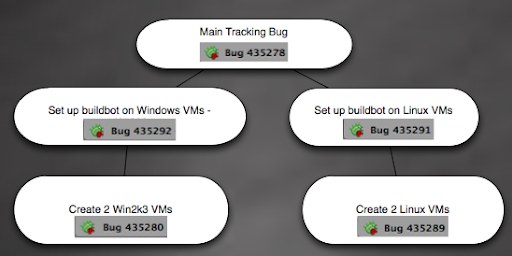
These bugs will allow me to go through the process of creating, setting up and deploying 4 new VMs so that I'll be able to see if they can handle both build and unittest builds. In a perfect world, they will be able to do this and that means we will set up a pool of buildslaves for each platform and delegate work from both build and unittest as needed. The goal is to be scalable and to use as little hardware as possible.
The reason I have to test this is because it's possible that VMs cannot successfully run unittests as they are written now. We need to know that the unittests can and will run before choosing this method.
More on this soon. Back to bringing WinXP vms up to date with mozilla-build instead of ye olde Cygwin.
This is just one (small) example:
These bugs will allow me to go through the process of creating, setting up and deploying 4 new VMs so that I'll be able to see if they can handle both build and unittest builds. In a perfect world, they will be able to do this and that means we will set up a pool of buildslaves for each platform and delegate work from both build and unittest as needed. The goal is to be scalable and to use as little hardware as possible.
The reason I have to test this is because it's possible that VMs cannot successfully run unittests as they are written now. We need to know that the unittests can and will run before choosing this method.
More on this soon. Back to bringing WinXP vms up to date with mozilla-build instead of ye olde Cygwin.
Tuesday, May 20, 2008
Vista Building with VC9
If you've been banging your head trying to build Firefox on Vista with the newest Visual Studio 2008 express edition (VC9) - know that it is possible now, and with minimal bruising of your forehead.
Two things you need to remember:
1. You have to run start-msvc9 in mozilla-build as administrator (if you do not your builds will fail with messages about bad file numbers and such)
2. You have to put the following four lines in your .mozconfig (for now - keep your eye out for a new rev of mozilla-build which should fix - current at 1.2)
That's it - after bug 419665 is checked in, there should be no other obvious issues unless you forget to run as administrator or check out when the tree is burning.
Happy Vista building.
Two things you need to remember:
1. You have to run start-msvc9 in mozilla-build as administrator (if you do not your builds will fail with messages about bad file numbers and such)
2. You have to put the following four lines in your .mozconfig (for now - keep your eye out for a new rev of mozilla-build which should fix - current at 1.2)
ac_add_options --disable-xpconnect-idispatch
ac_add_options --disable-activex
ac_add_options --disable-activex-scripting
ac_add_options --disable-accessibility
That's it - after bug 419665 is checked in, there should be no other obvious issues unless you forget to run as administrator or check out when the tree is burning.
Happy Vista building.
Tuesday, April 1, 2008
Build & Release - Learning about Talos
Armen and I are in California attending Build and Release team meetings this week. Over the next two days we'll be introduced to the many facets of the Build and Release workflow.
Todays first session was about Talos with Alice.
Here is the diagram of Talos (copied from the diagram Alice drew - yes Talos is a robot):

Alice walked us through how Talos gets its information from browser builds by having buildbot read for new builds from quickparse which is a text file. Buildbot has a script that knows what to look for in order to find new builds and there is a 5 minute delay before Talos is deployed because the information can get into quickparse before the build is finished and so therefore does not technically exist.
Currently there are 30 Production and 20 Stage Talos machines running, this past December there was only 1 Production machine and the stage machines.
This huge increase of Talos machines has led to an insane amount of data being gathered and a database which is in serious need of some help.
After Alice's presentation we all tried a standalone Talos so we could see the tests at work.
Anyone can try them, just follow these directions. If you are using a recent nightly you might need to add security.fileuri.strict_origin_policy : false to your sample.config file preferences because of new security features. Also, you can comment out the tjss tests because those are kind of boring - the fun test is the svg since you'll see a lot of graphics tests running on your browser. This standalone runs on a new profile so it's okay if you already have Firefox running when you run this script.
So the information that's generated is good for recognizing regression like in this bug, where if you look at the graph you can see how the build was chugging along, something got checked in that affected performance and then it was backed out and the performance went back to normal.
Pic here, see bug #425941 for more info:

More information on Talos Machines.
Todays first session was about Talos with Alice.
Here is the diagram of Talos (copied from the diagram Alice drew - yes Talos is a robot):

Alice walked us through how Talos gets its information from browser builds by having buildbot read for new builds from quickparse which is a text file. Buildbot has a script that knows what to look for in order to find new builds and there is a 5 minute delay before Talos is deployed because the information can get into quickparse before the build is finished and so therefore does not technically exist.
Currently there are 30 Production and 20 Stage Talos machines running, this past December there was only 1 Production machine and the stage machines.
This huge increase of Talos machines has led to an insane amount of data being gathered and a database which is in serious need of some help.
After Alice's presentation we all tried a standalone Talos so we could see the tests at work.
Anyone can try them, just follow these directions. If you are using a recent nightly you might need to add security.fileuri.strict_origin_policy : false to your sample.config file preferences because of new security features. Also, you can comment out the tjss tests because those are kind of boring - the fun test is the svg since you'll see a lot of graphics tests running on your browser. This standalone runs on a new profile so it's okay if you already have Firefox running when you run this script.
So the information that's generated is good for recognizing regression like in this bug, where if you look at the graph you can see how the build was chugging along, something got checked in that affected performance and then it was backed out and the performance went back to normal.
Pic here, see bug #425941 for more info:

More information on Talos Machines.
Sunday, February 17, 2008
Better late than never
Although my goal was to have the symbolstore.py patch approved for committal by week's end, I am very close. Today I spent about 5 hours tweaking the patch as per the most recent comments.
What was done:
* Makefile now checks for the environment variable of PDBSTR_PATH to be set before assigning the flag to source index
* Several minor logic changes to the symbolstore.py like removing redundant file path fixing
* I finally understood what Ted was saying about using a temp filename before checking for VCSinfo. This small change made it possible to remove 3 lines of work-arounds that I had been doing :)
* The hard-coding of the path to the pdbstr.exe executable is gone and has been replaced by whatever is in the environment variable
A few glitches:
* Making changes to the Makefile that resulted in errors left me with a makefile that couldn't update itself and Ted pointed me to doing a
* I had to look into how to get the environment variable in python - thanks to web search I found the os.environ.get() function
Other than that, it's all working and I'm very happy to be awaiting another review.
What was done:
* Makefile now checks for the environment variable of PDBSTR_PATH to be set before assigning the flag to source index
* Several minor logic changes to the symbolstore.py like removing redundant file path fixing
* I finally understood what Ted was saying about using a temp filename before checking for VCSinfo. This small change made it possible to remove 3 lines of work-arounds that I had been doing :)
* The hard-coding of the path to the pdbstr.exe executable is gone and has been replaced by whatever is in the environment variable
A few glitches:
* Making changes to the Makefile that resulted in errors left me with a makefile that couldn't update itself and Ted pointed me to doing a
make -f client.mk configure which regenerated the Makefiles and cleared that up* I had to look into how to get the environment variable in python - thanks to web search I found the os.environ.get() function
Other than that, it's all working and I'm very happy to be awaiting another review.
Wednesday, December 12, 2007
0.3 Release of the Source Server for Mozilla Firefox
Well, the big ball 'O duct tape that is my hacks on symbolstore.py are complete for now - here is the patch. This project will be carried on in the next term at which point I hope to address some of the current issues, namely - manipulating the directory structure, cleaning up the python code and assembling a unified documentation page.
For now - you may test out the fruits of my labour by downloading this installer of Firefox 3.0b2pre which will install Minefield in your Program Files/Minefield directory (you have no choice for installation dir.) and then copying these symbols into the folder where your Visual Studio (or Windbg) is looking for debug symbols.
The last thing you have to do in order for this to work is to put a path to cvs.exe in your PATH - I personally pointed it to the mozilla-build/mysys/bin/cvs.exe but if you like you can download cvs.exe and put it wherever you want.
Now that you have all you need, open up your debugger (VS or Windbg), attach it to the Minefield process and go!
It will ask you about the cvs calls that gather up the source code, say "OK" or "Run" or whatever is positive. The file should download into the proper /mozilla/whatever structure - on my computer it goes into Program Files/Microsoft Visual Studio 8/Common7/IDE/mozilla/...
That will be a focus in the next round, is manipulating the cvs command so that the source files go to a c:/temp or something. The debugger will automatically want to look for the path that the source file originally came from (in this case, my c:/ff_clean/mozilla/...) - you will have to point your debugger to the correct file the first time and then after that it knows to look in the mozilla folder you selected.
It works for now like what it is; a ball of duct tape that allows you to get the right source code for where you are in the browser without having a build on your computer.
I look forward to feedback about how this works for you, if you use it and if you have any problems arise.
For now - you may test out the fruits of my labour by downloading this installer of Firefox 3.0b2pre which will install Minefield in your Program Files/Minefield directory (you have no choice for installation dir.) and then copying these symbols into the folder where your Visual Studio (or Windbg) is looking for debug symbols.
The last thing you have to do in order for this to work is to put a path to cvs.exe in your PATH - I personally pointed it to the mozilla-build/mysys/bin/cvs.exe but if you like you can download cvs.exe and put it wherever you want.
Now that you have all you need, open up your debugger (VS or Windbg), attach it to the Minefield process and go!
It will ask you about the cvs calls that gather up the source code, say "OK" or "Run" or whatever is positive. The file should download into the proper /mozilla/whatever structure - on my computer it goes into Program Files/Microsoft Visual Studio 8/Common7/IDE/mozilla/...
That will be a focus in the next round, is manipulating the cvs command so that the source files go to a c:/temp or something. The debugger will automatically want to look for the path that the source file originally came from (in this case, my c:/ff_clean/mozilla/...) - you will have to point your debugger to the correct file the first time and then after that it knows to look in the mozilla folder you selected.
It works for now like what it is; a ball of duct tape that allows you to get the right source code for where you are in the browser without having a build on your computer.
I look forward to feedback about how this works for you, if you use it and if you have any problems arise.
Monday, December 3, 2007
3 main barriers to a complete 0.3 release of the source server
Here is the code I have so far in symbolstore.py
http://pastebin.mozilla.org/254868
My portion is specifically lines 36 - 71 where I am now gathering up a string of source files along with the revision number, and generating a (almost) properly formatted stream file in the pdb's directory.
Here are the barriers:
1. I would prefer to have a template where I have a variable %SOURCEFILES% that can be replaced and output to a new file for each pdb, instead of writing out each line of the stream file in symbolstore.py. If I can't get that happening for this release - oh well, Dave said it can be a bit ugly at the 0.3 stage. At least what I have right now, is creating the stream file properly.
2. On lines 38 and 39 - what I am making here is a string that looks like this: c:\mozilla/xpcom/glue/nsTraceRefcnt.h and in fact, this has to be c:\USERS_SOURCEFILE_DIR\mozilla\xpcom\glue\nsTraceRecnt.h -- so two things need to happen here, first, I need the / to be \ (except for the one after c:, cause it's right already) and second, for now I can probably name the dir "ff" and the user can make sure that VStudio is pointing to that path (c:\ff) when looking for source files...but in the long run? I don't know yet.
3. This is along the same lines as the template issue. The reason I haven't successfully implemented the template is because I don't know where to put, or how to create a path to, the right folders when symbolstore.py is being called. Unfortunately, it is not as easy as I had hoped in that putting the template in the same folder as symbolstore.py would allow me to open it with its name only. So as well as not being able to open the template, I don't know how I can call upon pdbstr from inside of symbolstore.py
That's going to be the last part, the first two are a little more pressing.
http://pastebin.mozilla.org/254868
My portion is specifically lines 36 - 71 where I am now gathering up a string of source files along with the revision number, and generating a (almost) properly formatted stream file in the pdb's directory.
Here are the barriers:
1. I would prefer to have a template where I have a variable %SOURCEFILES% that can be replaced and output to a new file for each pdb, instead of writing out each line of the stream file in symbolstore.py. If I can't get that happening for this release - oh well, Dave said it can be a bit ugly at the 0.3 stage. At least what I have right now, is creating the stream file properly.
2. On lines 38 and 39 - what I am making here is a string that looks like this: c:\mozilla/xpcom/glue/nsTraceRefcnt.h and in fact, this has to be c:\USERS_SOURCEFILE_DIR\mozilla\xpcom\glue\nsTraceRecnt.h -- so two things need to happen here, first, I need the / to be \ (except for the one after c:, cause it's right already) and second, for now I can probably name the dir "ff" and the user can make sure that VStudio is pointing to that path (c:\ff) when looking for source files...but in the long run? I don't know yet.
3. This is along the same lines as the template issue. The reason I haven't successfully implemented the template is because I don't know where to put, or how to create a path to, the right folders when symbolstore.py is being called. Unfortunately, it is not as easy as I had hoped in that putting the template in the same folder as symbolstore.py would allow me to open it with its name only. So as well as not being able to open the template, I don't know how I can call upon pdbstr from inside of symbolstore.py
That's going to be the last part, the first two are a little more pressing.
Wednesday, November 14, 2007
Source Server 0.2 release - HOWTO and Contribution Opportunity
Here are the goals for my 0.2 release
- release build of ff with debugger-info enabled to create pdbs without being a full debug build
- using lib xul - make an installer for people to download
- take the symbols and index them and distribute the source
- set up the symbol server but indexed so that someone can pull the source code
- which involves running the cv2http.cmd on the indexed code
And the results:
How to set up the Source and Symbol Server
- add a path to my symbolServer http://avnerd.tv/symbols/2007110200 as per MDC docs in Tools->Debugging->Symbols
- check the option for turning on the source server in Tools->Debugging->General
- Download the installer from here Firefox Installer **(FYI you have to use my installer because it is the one that I indexed code and uploaded symbols for - if you do not use this installer you will not get the proper results)
- install the firefox you just downloaded (it will install as Minefield in Program Files\Minefield)
- make sure you run it with --no-remote and -profilemanager so you don't mess up your normal Firefox experience
- once it's running, go to Tools->attach to process... and attach VStudio to the firefox instance
- after it's attached, you can go to Debug->break all and then poke around at the firefox functions code (You will get a warning about downloading code from an unknown source, click on "run" because you trust me)


This is what it might look like:

Contribution Opportunity
You need to be in the Windows platform and have a copy of Visual Studio to run the above instructions. If this applies to you, please take a minute to download the installer and follow the instructions as I've outlined them.
Please leave a comment answering the following questions:
- Did it work for you?
- Were the instructions clear?
- Any constructive feedback?
Saturday, November 10, 2007
Test Day X 2
Well today I got to run Full Functional Tests on Firefox 3 beta 1 and then this evening as I procrastinated from dealing with my Hamiltonian circuit assignment, I ran tests on Miro's 1.0rc release.
The two testing systems are very different even though they both use Litmus-based testing. Miro's tests are fewer, some are not well written and in some ways I find them to be very superficial. The Firefox tests have been around a lot longer so I'm sure that has allowed for quite a bit of fine tuning.
I'm not giving up on Miro but so far it's been challenging to get involved with that project to the degree with which I have been able to immerse myself in Mozilla projects. The lab the other day threw me into Thunderbird in a quick 'n dirty way and that was great - the documentation is all there. With Miro - well...when I went to look for docs on how to build with Windows...this and this. The gist of it is: "We can't really tell you how to build on windows because it's hard".
Well, now that I'm working on the Mac Book and I have VMWare Fusion with an Ubuntu vm, perhaps I can try building it in a Unix/Linux environment? There's a doc for Mac OS X and for Linux. We'll soon see.
Now, back to Mozilla stuff. My 0.2. release is due soon, I have already done a non-debug build of FF with the --enable-debugger-info-modules in the mozconfig and I've made the buildsymbols for it. Now I just have to index the pdb files and get the symbols and the source up on my server. Immediately after that is done (in the next day or two) I will look into a) how to make an installer and b) how to work with the CVStoHTTP script that comes with the srctools.
When I have an installer up, I'll be putting out the contrib call for anyone who can to grab the installer and try to hook it up with my symbol and source servers.
Stay tuned.
The two testing systems are very different even though they both use Litmus-based testing. Miro's tests are fewer, some are not well written and in some ways I find them to be very superficial. The Firefox tests have been around a lot longer so I'm sure that has allowed for quite a bit of fine tuning.
I'm not giving up on Miro but so far it's been challenging to get involved with that project to the degree with which I have been able to immerse myself in Mozilla projects. The lab the other day threw me into Thunderbird in a quick 'n dirty way and that was great - the documentation is all there. With Miro - well...when I went to look for docs on how to build with Windows...this and this. The gist of it is: "We can't really tell you how to build on windows because it's hard".
Well, now that I'm working on the Mac Book and I have VMWare Fusion with an Ubuntu vm, perhaps I can try building it in a Unix/Linux environment? There's a doc for Mac OS X and for Linux. We'll soon see.
Now, back to Mozilla stuff. My 0.2. release is due soon, I have already done a non-debug build of FF with the --enable-debugger-info-modules in the mozconfig and I've made the buildsymbols for it. Now I just have to index the pdb files and get the symbols and the source up on my server. Immediately after that is done (in the next day or two) I will look into a) how to make an installer and b) how to work with the CVStoHTTP script that comes with the srctools.
When I have an installer up, I'll be putting out the contrib call for anyone who can to grab the installer and try to hook it up with my symbol and source servers.
Stay tuned.
Friday, November 2, 2007
Something to show...
For my 5 hours between classes on Friday. Hopped into Litmus and joined in on Test Day. Managed to do 58 tests and filed my first bugs: 402219, 402228, and 402238.
I feel very accomplished. It's fun to find a bug, and I had an especially great crash that I was able to reproduce 3 times, and after Vlad's talk yesterday I am also looking forward to working on a patch and fixing a bug.
The past few days I have also been testing the waters over at Miro. What a difference size makes. Miro has only 11 staff - how many does Mozilla have? I would guess at least 20 or 30 times more. So far I haven't done a build of Miro yet, I'm going to work on that over the weekend. Can't wait to look at the source code and see what makes a video player. The funny (and somewhat frustrating) thing is that I have had to create new bugzilla and litmus accounts for Miro as my Mozilla ones don't carry forward. Someone hurry up and get that OpenID stuff working on everything!
I feel very accomplished. It's fun to find a bug, and I had an especially great crash that I was able to reproduce 3 times, and after Vlad's talk yesterday I am also looking forward to working on a patch and fixing a bug.
The past few days I have also been testing the waters over at Miro. What a difference size makes. Miro has only 11 staff - how many does Mozilla have? I would guess at least 20 or 30 times more. So far I haven't done a build of Miro yet, I'm going to work on that over the weekend. Can't wait to look at the source code and see what makes a video player. The funny (and somewhat frustrating) thing is that I have had to create new bugzilla and litmus accounts for Miro as my Mozilla ones don't carry forward. Someone hurry up and get that OpenID stuff working on everything!
Friday, October 19, 2007
0.1 Release
Here's what we're looking at.
I built a version of ff that was checked out from mozilla's cvs. From this version I called "make buildsymbols" and created the folder 2007092823 which contained all the pdb and symbol files for that build.
For information on how to use the symbol server - check out Benjamin Smedbergs blog. Instead of pointing VStudio to the mozilla symbol server, I wanted to point to a local server of symbols.
In order to test whether these symbols worked, I set up IIS on my laptop and served up the pdbs locally to make sure that Visual Studio was able to pull them properly. After a quick detour to set up the MIME types on my server, this worked just fine.
Then I used the indexing tools that come with the microsoft.com/whdc/devtools/debugging/default.mspx Debugging for Windows package.
First - using cvsindex.cmd and pointing out the symbol path and the source path, the pdb files are then indexed with the location of the source code for that build.
Second - using srctools.exe I pulled a sample list of the source files that are contained in a pdb file
All of this is available in a zip file - PDB files and sample source list and I look forward to feedback from anyone who wants to look at the sample source list and discuss how the next step of connecting the cvs to the local pdb files might work. Also you can go to my wiki page to sign up as a contributor or to read more.
At the moment this will not work for someone who is debugging unless they have my build of FF. That's what 0.2 is all about.
I built a version of ff that was checked out from mozilla's cvs. From this version I called "make buildsymbols" and created the folder 2007092823 which contained all the pdb and symbol files for that build.
For information on how to use the symbol server - check out Benjamin Smedbergs blog. Instead of pointing VStudio to the mozilla symbol server, I wanted to point to a local server of symbols.
In order to test whether these symbols worked, I set up IIS on my laptop and served up the pdbs locally to make sure that Visual Studio was able to pull them properly. After a quick detour to set up the MIME types on my server, this worked just fine.
Then I used the indexing tools that come with the microsoft.com/whdc/devtools/debugging/default.mspx Debugging for Windows package.
First - using cvsindex.cmd and pointing out the symbol path and the source path, the pdb files are then indexed with the location of the source code for that build.
Second - using srctools.exe I pulled a sample list of the source files that are contained in a pdb file
All of this is available in a zip file - PDB files and sample source list and I look forward to feedback from anyone who wants to look at the sample source list and discuss how the next step of connecting the cvs to the local pdb files might work. Also you can go to my wiki page to sign up as a contributor or to read more.
At the moment this will not work for someone who is debugging unless they have my build of FF. That's what 0.2 is all about.
Thursday, October 18, 2007
Extensibility with Mark Finkle
Today's class was a presentation with Mark Finkle from Mozilla Corp. These are my notes.
Started off in proprietary software
Has only been with Mozilla for a year
The joy of extensions
- Primary way to get involved is through add-ons (extensions)
- Plug-ins killed the web (according to some) and are kind of discouraged
- Any app that uses the mozilla platform can be enabled to use extensions
- There's built in support in the UI, cross platform, platform APIs
Sometime people put their content in a .jar and then in the .xpi necessary for installation. Mark doesn't not advocate for this method because it can make things more confusing to new developers than need be.
He suggests keeping things as simple as you possibly can. Don't use jar files, multiple levels, keep manifests simple. Don't mimic other extensions that are often written by more experienced programmers.
Ted (:luser) has created a xul editor that can generate the skeleton for you, and if you use this then you have everything you need - just add content.
Use the pages on the MDC about the boilerplate aspects of creating extensions.
Stressed the importance of using the id of the rid firefox element to add your customized elements. Otherwise they may show up as document.getElementByID but they will not in fact appear. They will be in the ether until you merge them properly with the id. Examples are vbox id="appcontent" or statusbar id="status-bar". Not merging properly is 90% of what people get stuck on when working on the UI elements of their application and it's often that they are not using the id properly, don't have the proper id or a syntax error.
Best Slide: "Mozilla is like an Onion: It makes you cry, it smells, it has layers"
Mozilla's Tech Layers (1. XUL/JS/CSS, 2. XBL, 3. XPCOM)
Talking about layers he tells us that the top layer (the UI) is the easiest to get involved with and make changes to, but it's also the least documented and has no API. Whereas the XPCOM layer is clean and documented and has APIs so in some ways it's great to work with because it's designed to be extensible.
A demo follows about trying to dig into the code via DOM inspector.
Google searching hint - put MDC in the search criteria to help narrow the results.
Highlighting of the Code Snippets section in MDC which can really help point you in the right direction.
Thanks for coming and talking with us Mark. I look forward to working on extensions in the future.
Started off in proprietary software
Has only been with Mozilla for a year
The joy of extensions
- Primary way to get involved is through add-ons (extensions)
- Plug-ins killed the web (according to some) and are kind of discouraged
- Any app that uses the mozilla platform can be enabled to use extensions
- There's built in support in the UI, cross platform, platform APIs
Sometime people put their content in a .jar and then in the .xpi necessary for installation. Mark doesn't not advocate for this method because it can make things more confusing to new developers than need be.
He suggests keeping things as simple as you possibly can. Don't use jar files, multiple levels, keep manifests simple. Don't mimic other extensions that are often written by more experienced programmers.
Ted (:luser) has created a xul editor that can generate the skeleton for you, and if you use this then you have everything you need - just add content.
Use the pages on the MDC about the boilerplate aspects of creating extensions.
Stressed the importance of using the id of the rid firefox element to add your customized elements. Otherwise they may show up as document.getElementByID but they will not in fact appear. They will be in the ether until you merge them properly with the id. Examples are vbox id="appcontent" or statusbar id="status-bar". Not merging properly is 90% of what people get stuck on when working on the UI elements of their application and it's often that they are not using the id properly, don't have the proper id or a syntax error.
Best Slide: "Mozilla is like an Onion: It makes you cry, it smells, it has layers"
Mozilla's Tech Layers (1. XUL/JS/CSS, 2. XBL, 3. XPCOM)
Talking about layers he tells us that the top layer (the UI) is the easiest to get involved with and make changes to, but it's also the least documented and has no API. Whereas the XPCOM layer is clean and documented and has APIs so in some ways it's great to work with because it's designed to be extensible.
A demo follows about trying to dig into the code via DOM inspector.
Google searching hint - put MDC in the search criteria to help narrow the results.
Highlighting of the Code Snippets section in MDC which can really help point you in the right direction.
Thanks for coming and talking with us Mark. I look forward to working on extensions in the future.
Wednesday, October 17, 2007
Learning to Litmus
Yesterday's Club Moz meeting was quite productive as we tackled doing QA tests with Litmus.
I encourage more folks to come to Club Moz next meeting: Tuesday October 30th at 4:30 in SEQ2119 (next to ACS). Every Tuesday is a test day for Mozilla@Seneca and this is a great way of getting your feet wet in Mozilla participation with ZERO prior experience.
If you know how to browse the web you're all set.
Here's a quick how-to for those who might want to get a head start at home:
1. Set up an account with Litmus (yes, i know another mozilla account...one day this will all be better, I'm sure)
2. Pick the build version you will run tests for (it's recommended that you use a clean, new profile):

3. Enter your Build ID and your system info. An easy way to find out your build id is to type "about:" in the browser address bar:


4. This takes you to a page where you can select what kind of tests you are interested in running might be:

5. Make your selection and here you go - a test to run:

Many of the tests are simple things that you might do anyway.
For the competitive out there, Club Moz president Anthony Hughes is currently the 4th highest tester with 3477 tests under his belt...does anyone want to give him a run for his money?
I encourage more folks to come to Club Moz next meeting: Tuesday October 30th at 4:30 in SEQ2119 (next to ACS). Every Tuesday is a test day for Mozilla@Seneca and this is a great way of getting your feet wet in Mozilla participation with ZERO prior experience.
If you know how to browse the web you're all set.
Here's a quick how-to for those who might want to get a head start at home:
1. Set up an account with Litmus (yes, i know another mozilla account...one day this will all be better, I'm sure)
2. Pick the build version you will run tests for (it's recommended that you use a clean, new profile):

3. Enter your Build ID and your system info. An easy way to find out your build id is to type "about:" in the browser address bar:


4. This takes you to a page where you can select what kind of tests you are interested in running might be:
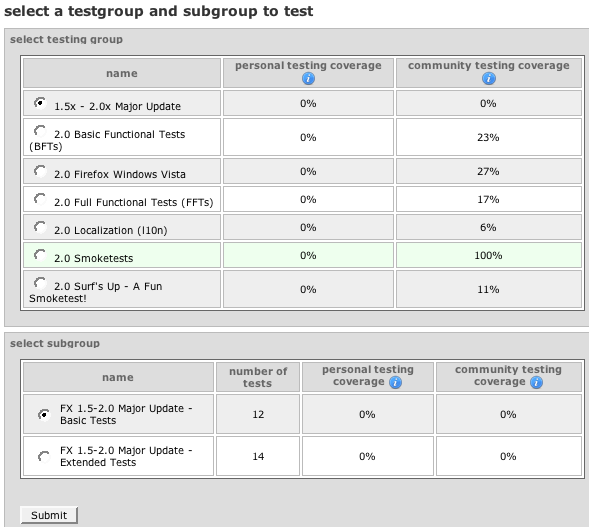
5. Make your selection and here you go - a test to run:

Many of the tests are simple things that you might do anyway.
For the competitive out there, Club Moz president Anthony Hughes is currently the 4th highest tester with 3477 tests under his belt...does anyone want to give him a run for his money?
Subscribe to:
Posts (Atom)