Since FSOSS my brain has been churning with many thoughts about my place in open source. According to Dave in this week's class we are all more elite than we may think and we all have potential to do great things in open source. It's hard to think that I can be in any way elite when I just failed a test in my data structures class...this is the first time I have failed anything school related and it doesn't inspire a sense of "I can take on the world". However, I know that it's just a glitch in my otherwise strong school record and so I will get beyond this.
What I've been thinking about lately is how I came to be in this program, in this open source class and how I seem to be experiencing a bit of a feeling that I am reverse engineering all the concepts that make up the open source community. My background *is* community whether it's theater, experimental films, activism, journalism, or just cultural - I have been and continue to be very active in a lot of communities. To me, a lot of the discussion about open source seems to be directed at technically sound cowboy coders who don't know how to work with others, trying to extol the virtues of a larger community and their immersion in it. I'm in the opposite lane - I know that community works, how it works and why I should be involved with it but I am constantly playing catch-up with the technical knowledge that others seem to eat and breathe.
Learning can be so erratic, it's challenging to stay focused and to not get discouraged at the fact that I often don't understand what it going on around me. In order to keep my head up I try to do something every day that is connected to school and open source learning. That can look different depending on the day. A couple of nights ago it was doing a build on a MacBook to practice for when I have my own. Yesterday it was signing up for Miro's tester mailing list and lurking on their irc channel (though that netted nothing...they are quiet folk).
One foot in front of the other, I will walk backwards and try to keep working on being a super user instead of just a user, try to be a contributor instead of a watcher, and keep telling myself that someday I will be an expert about something. That's the dream, that someday people will say "Oh you need _______, Lukas is the best person for that".
Wednesday, October 31, 2007

Friday, October 26, 2007
Long Day at FSOSS 2007
Well, it's the end of a long day. Starting out on my bike at 7:15 am and ending now, at 12:45 am (but I probably won't actually sleep until 1). I went to several talks, took lots of pictures and just wrapped up the rough draft of my FSOSS Report.
Had a great chat with Ted (:luser) about what goals to set for 0.2 and those have been posted to the project page.
That's all folks. See you tomorrow.
Had a great chat with Ted (:luser) about what goals to set for 0.2 and those have been posted to the project page.
That's all folks. See you tomorrow.
Friday, October 19, 2007
0.1 Release
Here's what we're looking at.
I built a version of ff that was checked out from mozilla's cvs. From this version I called "make buildsymbols" and created the folder 2007092823 which contained all the pdb and symbol files for that build.
For information on how to use the symbol server - check out Benjamin Smedbergs blog. Instead of pointing VStudio to the mozilla symbol server, I wanted to point to a local server of symbols.
In order to test whether these symbols worked, I set up IIS on my laptop and served up the pdbs locally to make sure that Visual Studio was able to pull them properly. After a quick detour to set up the MIME types on my server, this worked just fine.
Then I used the indexing tools that come with the microsoft.com/whdc/devtools/debugging/default.mspx Debugging for Windows package.
First - using cvsindex.cmd and pointing out the symbol path and the source path, the pdb files are then indexed with the location of the source code for that build.
Second - using srctools.exe I pulled a sample list of the source files that are contained in a pdb file
All of this is available in a zip file - PDB files and sample source list and I look forward to feedback from anyone who wants to look at the sample source list and discuss how the next step of connecting the cvs to the local pdb files might work. Also you can go to my wiki page to sign up as a contributor or to read more.
At the moment this will not work for someone who is debugging unless they have my build of FF. That's what 0.2 is all about.
I built a version of ff that was checked out from mozilla's cvs. From this version I called "make buildsymbols" and created the folder 2007092823 which contained all the pdb and symbol files for that build.
For information on how to use the symbol server - check out Benjamin Smedbergs blog. Instead of pointing VStudio to the mozilla symbol server, I wanted to point to a local server of symbols.
In order to test whether these symbols worked, I set up IIS on my laptop and served up the pdbs locally to make sure that Visual Studio was able to pull them properly. After a quick detour to set up the MIME types on my server, this worked just fine.
Then I used the indexing tools that come with the microsoft.com/whdc/devtools/debugging/default.mspx Debugging for Windows package.
First - using cvsindex.cmd and pointing out the symbol path and the source path, the pdb files are then indexed with the location of the source code for that build.
Second - using srctools.exe I pulled a sample list of the source files that are contained in a pdb file
All of this is available in a zip file - PDB files and sample source list and I look forward to feedback from anyone who wants to look at the sample source list and discuss how the next step of connecting the cvs to the local pdb files might work. Also you can go to my wiki page to sign up as a contributor or to read more.
At the moment this will not work for someone who is debugging unless they have my build of FF. That's what 0.2 is all about.
Thursday, October 18, 2007
Extensibility with Mark Finkle
Today's class was a presentation with Mark Finkle from Mozilla Corp. These are my notes.
Started off in proprietary software
Has only been with Mozilla for a year
The joy of extensions
- Primary way to get involved is through add-ons (extensions)
- Plug-ins killed the web (according to some) and are kind of discouraged
- Any app that uses the mozilla platform can be enabled to use extensions
- There's built in support in the UI, cross platform, platform APIs
Sometime people put their content in a .jar and then in the .xpi necessary for installation. Mark doesn't not advocate for this method because it can make things more confusing to new developers than need be.
He suggests keeping things as simple as you possibly can. Don't use jar files, multiple levels, keep manifests simple. Don't mimic other extensions that are often written by more experienced programmers.
Ted (:luser) has created a xul editor that can generate the skeleton for you, and if you use this then you have everything you need - just add content.
Use the pages on the MDC about the boilerplate aspects of creating extensions.
Stressed the importance of using the id of the rid firefox element to add your customized elements. Otherwise they may show up as document.getElementByID but they will not in fact appear. They will be in the ether until you merge them properly with the id. Examples are vbox id="appcontent" or statusbar id="status-bar". Not merging properly is 90% of what people get stuck on when working on the UI elements of their application and it's often that they are not using the id properly, don't have the proper id or a syntax error.
Best Slide: "Mozilla is like an Onion: It makes you cry, it smells, it has layers"
Mozilla's Tech Layers (1. XUL/JS/CSS, 2. XBL, 3. XPCOM)
Talking about layers he tells us that the top layer (the UI) is the easiest to get involved with and make changes to, but it's also the least documented and has no API. Whereas the XPCOM layer is clean and documented and has APIs so in some ways it's great to work with because it's designed to be extensible.
A demo follows about trying to dig into the code via DOM inspector.
Google searching hint - put MDC in the search criteria to help narrow the results.
Highlighting of the Code Snippets section in MDC which can really help point you in the right direction.
Thanks for coming and talking with us Mark. I look forward to working on extensions in the future.
Started off in proprietary software
Has only been with Mozilla for a year
The joy of extensions
- Primary way to get involved is through add-ons (extensions)
- Plug-ins killed the web (according to some) and are kind of discouraged
- Any app that uses the mozilla platform can be enabled to use extensions
- There's built in support in the UI, cross platform, platform APIs
Sometime people put their content in a .jar and then in the .xpi necessary for installation. Mark doesn't not advocate for this method because it can make things more confusing to new developers than need be.
He suggests keeping things as simple as you possibly can. Don't use jar files, multiple levels, keep manifests simple. Don't mimic other extensions that are often written by more experienced programmers.
Ted (:luser) has created a xul editor that can generate the skeleton for you, and if you use this then you have everything you need - just add content.
Use the pages on the MDC about the boilerplate aspects of creating extensions.
Stressed the importance of using the id of the rid firefox element to add your customized elements. Otherwise they may show up as document.getElementByID but they will not in fact appear. They will be in the ether until you merge them properly with the id. Examples are vbox id="appcontent" or statusbar id="status-bar". Not merging properly is 90% of what people get stuck on when working on the UI elements of their application and it's often that they are not using the id properly, don't have the proper id or a syntax error.
Best Slide: "Mozilla is like an Onion: It makes you cry, it smells, it has layers"
Mozilla's Tech Layers (1. XUL/JS/CSS, 2. XBL, 3. XPCOM)
Talking about layers he tells us that the top layer (the UI) is the easiest to get involved with and make changes to, but it's also the least documented and has no API. Whereas the XPCOM layer is clean and documented and has APIs so in some ways it's great to work with because it's designed to be extensible.
A demo follows about trying to dig into the code via DOM inspector.
Google searching hint - put MDC in the search criteria to help narrow the results.
Highlighting of the Code Snippets section in MDC which can really help point you in the right direction.
Thanks for coming and talking with us Mark. I look forward to working on extensions in the future.
Wednesday, October 17, 2007
Learning to Litmus
Yesterday's Club Moz meeting was quite productive as we tackled doing QA tests with Litmus.
I encourage more folks to come to Club Moz next meeting: Tuesday October 30th at 4:30 in SEQ2119 (next to ACS). Every Tuesday is a test day for Mozilla@Seneca and this is a great way of getting your feet wet in Mozilla participation with ZERO prior experience.
If you know how to browse the web you're all set.
Here's a quick how-to for those who might want to get a head start at home:
1. Set up an account with Litmus (yes, i know another mozilla account...one day this will all be better, I'm sure)
2. Pick the build version you will run tests for (it's recommended that you use a clean, new profile):

3. Enter your Build ID and your system info. An easy way to find out your build id is to type "about:" in the browser address bar:


4. This takes you to a page where you can select what kind of tests you are interested in running might be:
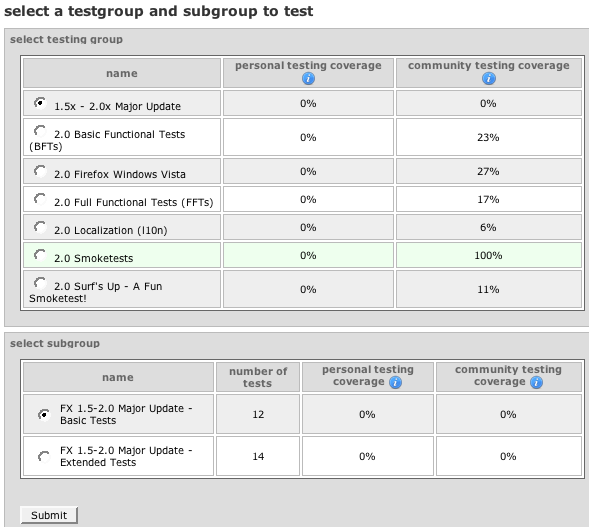
5. Make your selection and here you go - a test to run:

Many of the tests are simple things that you might do anyway.
For the competitive out there, Club Moz president Anthony Hughes is currently the 4th highest tester with 3477 tests under his belt...does anyone want to give him a run for his money?
I encourage more folks to come to Club Moz next meeting: Tuesday October 30th at 4:30 in SEQ2119 (next to ACS). Every Tuesday is a test day for Mozilla@Seneca and this is a great way of getting your feet wet in Mozilla participation with ZERO prior experience.
If you know how to browse the web you're all set.
Here's a quick how-to for those who might want to get a head start at home:
1. Set up an account with Litmus (yes, i know another mozilla account...one day this will all be better, I'm sure)
2. Pick the build version you will run tests for (it's recommended that you use a clean, new profile):
3. Enter your Build ID and your system info. An easy way to find out your build id is to type "about:" in the browser address bar:
4. This takes you to a page where you can select what kind of tests you are interested in running might be:
5. Make your selection and here you go - a test to run:
Many of the tests are simple things that you might do anyway.
For the competitive out there, Club Moz president Anthony Hughes is currently the 4th highest tester with 3477 tests under his belt...does anyone want to give him a run for his money?
Wearing grey socks makes all the difference, right?
What did I do?
Today, the indexing worked.
See the command here:
And the output.txt.
See how now it is indexing the files?! Cool.
So what did I do differently than last time?
ssindex.cmd [STATUS] : Server ini file: C:\Program Files\Debugging Tools for Windows\sdk\srcsrv\srcsrv.ini
ssindex.cmd [STATUS] : Source root : c:\ff\mozilla
ssindex.cmd [STATUS] : Symbols root : c:\ff\mozilla\objdir\dist\crashreporter-symbols\2007092823
ssindex.cmd [STATUS] : Control system : CVS
ssindex.cmd [STATUS] : CVS Root : :pserver:anonymous@cvs-mirror.mozilla.org:/cvsroot
ssindex.cmd [STATUS] : CVS program name: cvs.exe
ssindex.cmd [STATUS] : CVS Label :
ssindex.cmd [STATUS] : CVS Date : 10/09/07
ssindex.cmd [STATUS] : Old path root :
ssindex.cmd [STATUS] : New path root :
ssindex.cmd [WARN ] : Command line option "-server=cvs" is unrecognized.
--------------------------------------------------------------------------------
ssindex.cmd [STATUS] : Server ini file: C:\Program Files\Debugging Tools for Windows\sdk\srcsrv\srcsrv.ini
ssindex.cmd [STATUS] : Source root : c:\ff\mozilla
ssindex.cmd [STATUS] : Symbols root : c:\symbolServer\2007092823
ssindex.cmd [STATUS] : Control system : CVS
ssindex.cmd [STATUS] : CVS Root : :pserver:anonymous@cvs-mirror.mozilla.org:/cvsroot
ssindex.cmd [STATUS] : CVS program name: cvs.exe
ssindex.cmd [STATUS] : CVS Label :
ssindex.cmd [STATUS] : CVS Date : 10/17/2007
ssindex.cmd [STATUS] : Old path root :
ssindex.cmd [STATUS] : New path root :
So really, the only differences between this time and last time is that I pointed to the symbols on my IIS symbolServer instead of the ones that were in the crashreport-symbols. Same symbols, different location. I think that must have made more of a difference than using -debug which did not seem to do anything (and that's probably because I just re-read the documentation and it's /debug).
Now I am going to test it and run some tools on the pdb files to see what's in them.
Today, the indexing worked.
See the command here:
cvsindex -server=cvs -source=c:\ff\mozilla -symbols=c:\symbolServer\2007092823 -debug > output.txt
And the output.txt.
See how now it is indexing the files?! Cool.
So what did I do differently than last time?
Last Time:
ssindex.cmd [STATUS] : Server ini file: C:\Program Files\Debugging Tools for Windows\sdk\srcsrv\srcsrv.ini
ssindex.cmd [STATUS] : Source root : c:\ff\mozilla
ssindex.cmd [STATUS] : Symbols root : c:\ff\mozilla\objdir\dist\crashreporter-symbols\2007092823
ssindex.cmd [STATUS] : Control system : CVS
ssindex.cmd [STATUS] : CVS Root : :pserver:anonymous@cvs-mirror.mozilla.org:/cvsroot
ssindex.cmd [STATUS] : CVS program name: cvs.exe
ssindex.cmd [STATUS] : CVS Label :
ssindex.cmd [STATUS] : CVS Date : 10/09/07
ssindex.cmd [STATUS] : Old path root :
ssindex.cmd [STATUS] : New path root :
This Time:
ssindex.cmd [WARN ] : Command line option "-server=cvs" is unrecognized.
--------------------------------------------------------------------------------
ssindex.cmd [STATUS] : Server ini file: C:\Program Files\Debugging Tools for Windows\sdk\srcsrv\srcsrv.ini
ssindex.cmd [STATUS] : Source root : c:\ff\mozilla
ssindex.cmd [STATUS] : Symbols root : c:\symbolServer\2007092823
ssindex.cmd [STATUS] : Control system : CVS
ssindex.cmd [STATUS] : CVS Root : :pserver:anonymous@cvs-mirror.mozilla.org:/cvsroot
ssindex.cmd [STATUS] : CVS program name: cvs.exe
ssindex.cmd [STATUS] : CVS Label :
ssindex.cmd [STATUS] : CVS Date : 10/17/2007
ssindex.cmd [STATUS] : Old path root :
ssindex.cmd [STATUS] : New path root :
So really, the only differences between this time and last time is that I pointed to the symbols on my IIS symbolServer instead of the ones that were in the crashreport-symbols. Same symbols, different location. I think that must have made more of a difference than using -debug which did not seem to do anything (and that's probably because I just re-read the documentation and it's /debug).
Now I am going to test it and run some tools on the pdb files to see what's in them.
Monday, October 15, 2007
Going in circles
I don't know how many times I can read the 3 main sources of information about this source server business. Everytime I read them it's like being in a house of mirrors. Tonight I found a new site that refers to a source server. Once again I hear how amazing this source server is, yet no real information about how to make it happen. His final sentence - "After all, "It just works!" Why would I need to know anything more? :-)" is just poking at me as I am so in need of knowing more and can't find a single human being who knows more.
The main msdn help files state that:
So does this mean that I need to add something to the firefox build files that will do this indexing around the same time that the buildsymbols are pulled? Around the time that the build wraps up? And if yes, then what do I put there? Why is there not ONE example of someone successfully writing a source server for their project? If this source server is so amazing (and it sure sounds like it will be) then why no examples? No discussion in the msdn community forums, no blogs, nothing.
I emailed a person who sounded like they had written one for their versioning system, he wrote back and said that it actually wasn't him, it was another team member.
Is the source server really an urban legend? Has *anyone* seen it in action?
The main msdn help files state that:
Generally, binaries are source indexed during the build process after the application has been built. The information needed by source server is stored in the PDB files.
So does this mean that I need to add something to the firefox build files that will do this indexing around the same time that the buildsymbols are pulled? Around the time that the build wraps up? And if yes, then what do I put there? Why is there not ONE example of someone successfully writing a source server for their project? If this source server is so amazing (and it sure sounds like it will be) then why no examples? No discussion in the msdn community forums, no blogs, nothing.
I emailed a person who sounded like they had written one for their versioning system, he wrote back and said that it actually wasn't him, it was another team member.
Is the source server really an urban legend? Has *anyone* seen it in action?
Subscribe to:
Posts (Atom)